Tuesday, 23 June 2020

SSAS Multidimensional and Tabular Models

SQL Server Analysis Server provides several approaches for creating a Business Intelligence semantic Model  : Tabular and Multidimensional. The amount and type of data you need to import can be primary consideration when deciding which model type best fits your data. Tabular and Multidimensional models use imported data from external sources. SSAS Tabular Model uses advanced technology, introduced by Microsoft with SQL Server 2012  

Multidimensional Model :

  • Multidimensional model uses OLAP modelling standards such as cubes, dimensions and facts 
  • It uses MOLAP, ROLAP or HOLAP storage for modelling 
  • Multidimensional model databases can use dimensions and cell - level security, using role-based permissions 
  • In multidimensional models, All logic and calculations use MDX (Multi-Dimensional Expressions)
  • Multidimensional Models are useful in case of large amount of datasets (in terabytes), Many-to-Many relationships, require complex modeling and write - back support. 
  • Multidimensional Models require plenty of high speed disks because it stores large of amount of data 

Tabular Model :

  • Tabular Model are in-memory databases, uses relational modelling standards such as tables and relationships 
  • Tabular Model uses xVelocity/Vertipaq mechanism, which is much faster than Multidimensional model
  • Tabular Model databases can use row-level security, using role based permissions
  • In Tabular Models, business logics are created in DAX (Data Analysis Expressions) , It is very easy as compare to MDX and very much Excel-like functions designed for business requirements
  • Only tabular models are supported in Azure Analysis Service
  • Tabular Model is not for a system that are going to load terabytes of data 
  • Since tabular model uses in-memory technology , need plenty of RAM as the entire database sits in the memory. It has more efficient data compression as compare to Multidimensional models 
The following table summarizes features availability at the model level :


 Multidimensional 

 Tabular 
 Modeling 
  Multi-Dimensional 
 (Dimensional Modeling)
 Relational Modeling 
 Storage  MOLAP, ROLAP, HOLAP In-memory and Direct Query
 Query  MDX
(Multidimensional Expressions)         
DAX   
(Data Analysis Expressions)        
 Structure Rigid Structure          Loose Structure 
 Complexity  Complex  Simple 
Size Larger  Small 
Aggregations  Yes  No 
Calculated Columns  No  Yes 
Hierarchies  Yes Yes 
 KPIs Yes  Yes 
 Partitions Yes  Yes 
 Perspectives Yes  Yes 


Saturday, 20 April 2019

SSIS : Execute SSIS Packages with T-SQL using SSISDB Catalog

There are several ways to execute SSIS packages that have been deployed to SSISDB catalog. One of method is using T-SQL statement or SQL stored procedures. It is the most flexible way to execute SSIS catalog deployed packages. There are multiple scenarios where it is very handy or helpful  to run SSIS package from T-SQL quires or SQL stored procedures.


The following steps will cover the requirement :

1. Connect to SSMS and open SSIS catalog database, check the required SSIS package :


2. Right Click on SSIS package and click on execute :

3. Now, Need to select the Parameter used in SSIS package, click on three dots (...) belongs to parameter(s)  and input the require value :


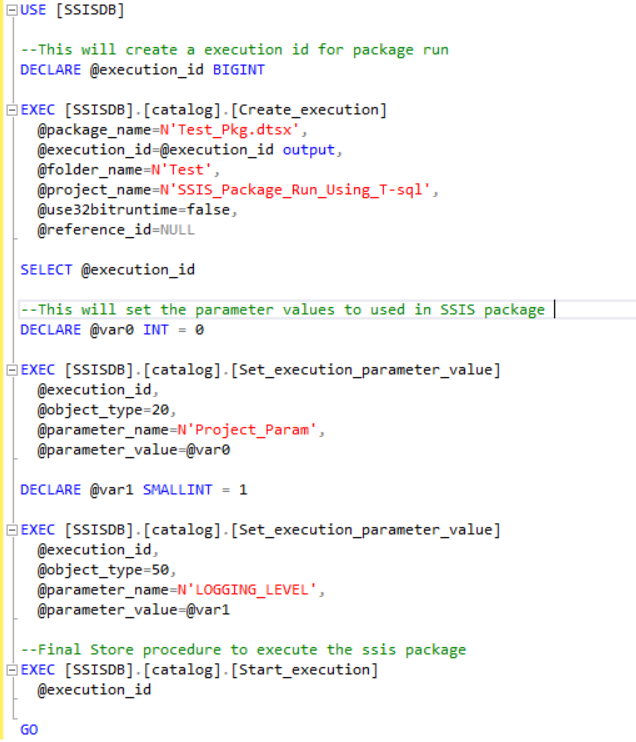
4. After parameter inputs, click on script (Top Left) to generate the following script :


The above code can be copied from here :

USE [SSISDB] 

--This will create a execution id for package run 
DECLARE @execution_id BIGINT 
EXEC [SSISDB].[catalog].[Create_execution] 
  @package_name=N'Test_Pkg.dtsx', 
  @execution_id=@execution_id output, 
  @folder_name=N'Test', 
  @project_name=N'SSIS_Package_Run_Using_T-sql', 
  @use32bitruntime=false, 
  @reference_id=NULL 

SELECT @execution_id 

--This will set the parameter values to used in SSIS package 
DECLARE @var0 INT = 0 
EXEC [SSISDB].[catalog].[Set_execution_parameter_value] 
  @execution_id, 
  @object_type=20, 
  @parameter_name=N'Project_Param', 
  @parameter_value=@var0 

DECLARE @var1 SMALLINT = 1
EXEC [SSISDB].[catalog].[Set_execution_parameter_value] 
  @execution_id, 
  @object_type=50, 
  @parameter_name=N'LOGGING_LEVEL', 
  @parameter_value=@var1 

--Final Store procedure to execute the ssis package  
EXEC [SSISDB].[catalog].[Start_execution] 
  @execution_id 

GO

Conclusion : 

In this post, I have demonstrated how to run catalog deployed SSIS package using T-SQL statements. We can develop a stored proc to fulfill requirements and run SSIS packages using T-SQL.

Tuesday, 31 December 2013

SQL SERVER : Find the Size of Database file and Log file

Data and log information are never mixed on the same file, and individual files are used only by one database.

The database files (Primary / Secondary) are used for storing data. For each database file there will be a Log file associated, this is the transaction log file used to store the user transactions.

Please find the below code and Screenshot for finding the size of database and log file:

Code :

SELECT DB_NAME (database_id) AS Database_Name, Name AS Logical_Name,
Physical_Name, (size*8)/1024 SizeMB
FROM sys.master_files
WHERE DB_NAME(database_id) = <databasename>


Scrennshot : 


Thursday, 26 December 2013

SQL SERVER : Find out Nth Largest value

It is very common question for interview, to find out the 2nd or Nth largest salary of employee.

Please find the below methods to find out the answer :

Method 1 :

SELECT TOP 1 [Column_Name] FROM [Table_Name] 
WHERE [Column_Name] NOT IN (SELECT DISTINCT TOP (n-1) [Column_Name] FROM  [Table_Name] ORDER BY [Column_Name] DESC )
ORDER BY [Coumn_Name] DESC

Method 2 :

SELECT * FROM (SELECT *, DENSE_RANK() OVER(ORDER BY [Column_Name] DESC ) AS Name FROM [Table_Name]) DQ
WHERE DQ.Name = n

*n = for nth largest

SQL SERVER : Difference Between UNIQUE KEY and PRIMARY KEY

PRIMARY Key and UNIQUE Key enforce the Uniqueness of the values on the column[columns] on which it is defined.


  •  By Default, UNIQUE Key creates a NON CLUSTERED INDEX while PRIMARY Key creates a   CLUSTERED  INDEX 
  • You can create multiple UNIQUE Keys on a table but you can have ONLY One PRIMARY Key on a table.
  • PRIMARY Key can be used in Foreign key relationship where as UNIQUE Key can not be used.
  • PRIMARY Keys can not have nulls but UNIQUE Key allows null value (But only one null value). 


Sunday, 3 November 2013

SQL SERVER : SP_WHO and SP_WHO2

There is very useful system stored procedure called sp_who on Sql server that lists users and processes running on the system. It comes handy when you want to see if any process is blocked. Both sp_who and sp_who2 provides information about the current processes / sessions / users in sql server instances. sp_who2 provides some more information as compare to the sp_who.

SP_WHO : SP_WHO provides information like logged in user id, session id, host name ,session status, blocking process details , database name etc.

SP_WHO2 : SP_WHO2 provides some more information - CPU time for each session, Disk IO, Last Batch , Program name.


As such there is no difference in both SPs but the major one is that SP_WHO2 is not a documented it is an undocumented stored procedure.

Above two SPs can be used to monitor the server connections. Also these can be used to check the connections created for specific login/specific session /active session. You can filter the data returned to show only those processes that are not idle. if you specify a particular user like sp_who  [@login_name=]'Login' then you get processes for that user , otherwise all processes for all users will be listed .


Saturday, 2 November 2013

SQL SERVER : Difference between SQL Server Temporary table and Table Variable

Temporary Table :

Temporary tables are created in TEMP DB. A temporary table is easy to create and back up data. They act like regular tables in that you can query their data via SELECT queries and modify their data via UPDATE,INSERT and DELETE statements.If temporary table created inside a store procedure they are destroyed upon completion of the stored procedure.Temporary tables are real tables so you can do things like CREATE Indexes etc. The scope of any temporary table is the session in which it is created.You can create a temporary table using SELECT INTO, which can be quicker to write and may allow you to deal with changing datatypes over time, since you don't need to define your temporary table structure upfront.

There are two different temporary table types : Local and Global 
Local temporary tables are prefixed with a single # sign.Local temporary table tables are available for use by the current user connection that created them.Multiple connections can create the same named temporary table for local temporary tables without encountering conflicts.The internal representation of the local table is given a unique name,so as not to conflict with other temporary tables with the same name created by the other connections in the TEMP database. Local temporary tables are dropped by using the DROP statement or are automatically removed from memory when the user connection is closed.
Global temporary tables are prefixed with a double ## sign. Global temporary table have different scope from local temporary tables.Once connection creates a global temporary table, any user with proper permission to the current database he is in, can access the table.Unlike local temporary tables, you can not create simultaneous versions of a global temporary tables, as this will produce a naming conflict.Global temporary tables are removed from sql server if explicitly dropped by DROP Table. They are also automatically removed after the connection that created it disconnects and the global temporary is no longer referenced by the other connections. 

The Syntax to creating a temporary table is similar to creating a physical table in SQL Server with the exception of the a aforementioned pound sign(#):
CREATE TABLE #TmpTable
(
ID INT NOT NULL,
Name VARCHAR(20)
)

Table Variables:

A table variable is a data type that can be used within a Transact-SQL batch, stored procedure, or function.Table variables are good replacements of temporary tables when the data set is small. Statistics are not maintained for table variables like they are for regular or temporary tables, so using too large a table variable may cause query optimization issues.Unlike regular tables or temporary tables , table variables can't have indexes or FOREIGN KEY constraints added to them. Table variables do allow some constraints to be used in the definition (PRIMARY KEY , UNIQUE,CHECK ). Table variable performance suffers when the result set becomes too large or when column data cardinality is critical to the query optimization process.

The syntax to creating a table variables is similar to creating a table, only the DECLARE keyword is used and the table name is prefixed with an @ symbol :
DECLARE @TableName TABLE
( 
ID INT NOT NULL,
Name VARCHAR(20)
)


The main difference between temporary table and table variable is that transaction logs are not recorded for the table variables. Hence they are out of scope of the transaction mechanism. Both table variables and temporary tables are stored in TEMP database. This means you should be aware of issues such as COLLATION problems if your database collation is different to your server collation.Temporary tables and table variable will by default inherit the collation of the server, causing problems if you want to compare data in them with data in your database. Depending on the situation as well as the version and service pack of SQL server that is installed, the performance metrics of table variable versus temporary tables can change. Unless the performance metrics change significantly using one or the other, your best option is to pick the one that makes the most sense in the current situation and stick with it. 

Using Polybase to load data into Azure Synapse Analytics (SQL DW) from Blob Storage

Azure Synapse Analytics supports many data loading methods. The fastest and most scalable way to load is through Polybase technology. Polyba...